What are email spam traps?
Spam traps are email addresses deliberately maintained by inbox providers, anti-spam organisations, and blocklist operators to identify senders with poor list hygiene. They never belong to real users — they exist solely to catch emailers who are sending to addresses they shouldn't have.
When an email reaches a spam trap, it's recorded as a strong negative signal. Enough trap hits can trigger blocklisting of your sending domain or IP — sometimes within a single campaign.
Trap risk usually rises when lists have been left to decay or when risky B2B addresses stay in circulation, so this article complements what email list decay is and the role-based email addresses guide.
The three types of spam traps
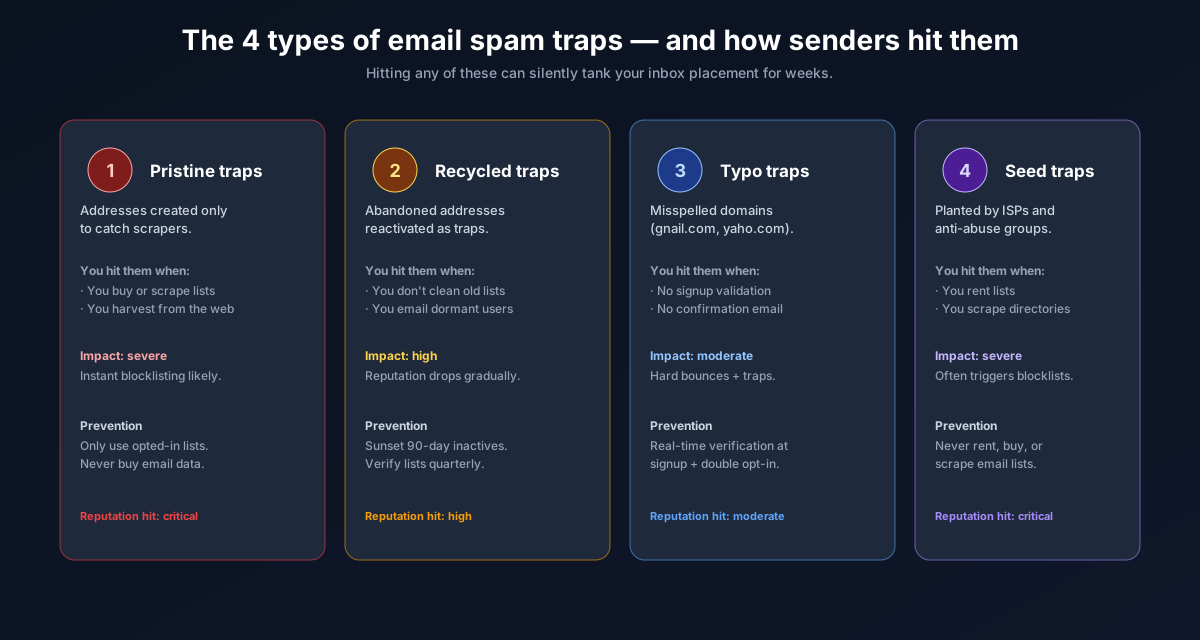
1. Pristine traps (pure spam traps)
These addresses have never been used by a real person. They're seeded across the internet — embedded in webpage source code, forum posts, and databases — waiting to be harvested by scrapers. If you're sending to a pristine trap, it means your list was scraped or purchased from a source that collected addresses without consent.
Sending to pristine traps is the most severe type of trap hit and can trigger immediate blocklisting.
2. Recycled traps (repurposed spam traps)
These were once real, active email addresses but were deactivated after a period of inactivity — and then repurposed as traps by the ISP or domain owner. Before conversion, they typically generate hard bounces for some time. If you suppressed hard bounces correctly, you would have removed them before they became traps.
Hitting recycled traps indicates that your list contains old, stale addresses that weren't properly removed after they started bouncing.
3. Typo traps
These are real-looking addresses at common typo domains — gmial.com,
yaho.com, hotmial.com — that trap senders who imported
subscriber data without syntax validation. A good email verifier catches these immediately.
How spam traps end up on your list
- Purchased or rented lists — third-party list vendors routinely have pristine traps seeded into their data. Any purchased list carries trap risk.
- Scraped email addresses — scraping public web pages picks up trap addresses deliberately seeded there.
- Old lists that weren't maintained — recycled traps accumulate over time in any list where hard bounces weren't suppressed promptly.
- No syntax validation at signup — typo traps enter through sign-up forms that don't validate email format.
How to avoid spam traps
Never buy or rent email lists
This is the single most reliable way to avoid pristine trap hits. Permission-based lists built from genuine opt-ins do not contain pristine traps by definition — no one "signed up" to be a trap.
Validate syntax at the point of entry
Use real-time validation on your signup forms to catch typos before they enter your database. At minimum, validate email format. For higher-value signups, consider real-time SMTP verification via the ListEmailCheck API to confirm the address exists before accepting it.
Suppress hard bounces immediately
Recycled traps are born from addresses that bounced and weren't removed. After every campaign, add all hard-bounced addresses to a global suppression list. Never retry them.
Verify your list before sending to old or dormant segments
Any list that hasn't been sent to in 6+ months carries meaningful trap risk. Run it through ListEmailCheck's bulk verifier before reactivating — invalid addresses flagged by the verifier include many that would otherwise become trap hits.
Use double opt-in
Confirmed opt-in ensures that every address on your list was actively verified by a real person clicking a confirmation link. This eliminates both typo traps (a real person wouldn't confirm a typo) and any pristine traps that might have been submitted.
What to do if you suspect you've hit a spam trap
- Pause sending from the affected domain immediately
- Check MXToolbox and Spamhaus to confirm whether your domain or IP is blocklisted
- Identify the list source that likely introduced the trap (purchased data, a specific import)
- Remove that segment entirely and verify your remaining list
- If blocklisted, follow the delisting process for the specific blocklist (Spamhaus, Barracuda, etc.)
- Re-warm from low volumes before scaling again
Key takeaways
- Spam traps are addresses maintained to catch senders with poor list hygiene — hitting them causes blocklisting
- Three types: pristine (never a real address), recycled (deactivated then repurposed), typo (misspelled real domains)
- Never purchase or rent email lists — pristine traps are inherent in that data
- Suppress all hard bounces immediately after every send to prevent recycled trap exposure
- Double opt-in prevents both typo traps and pristine traps from entering your list
- Verify old or dormant lists with the free ListEmailCheck bulk verifier before reactivating them.