What are role-based email addresses?
Role-based email addresses are addresses tied to a function or department rather than an individual person. Common examples include:
info@company.comsupport@company.comcontact@company.comsales@company.comhello@company.comadmin@company.comnoreply@company.comteam@company.com
In B2B datasets, role accounts often show up alongside catch-all domains, so compare this with the B2B email list cleaning guide and what a catch-all email domain is before deciding what to suppress.
These addresses typically route to a shared inbox monitored by multiple people, or in some cases, route to no one at all.
Why role-based addresses cause problems
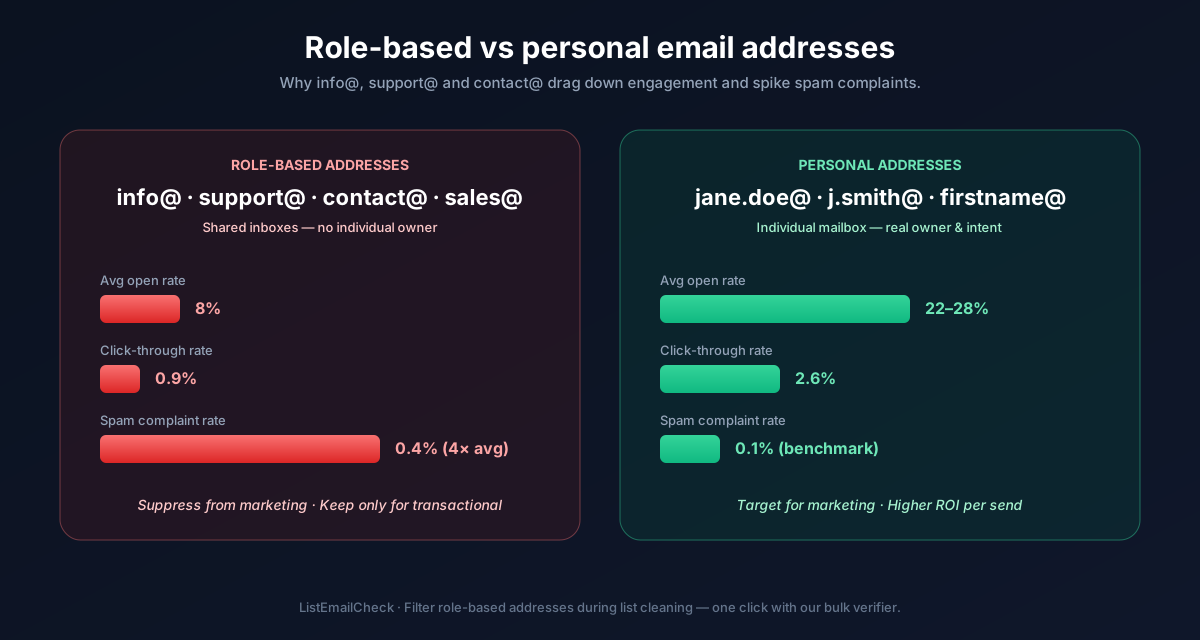
Higher spam complaint rates
Shared inboxes are often monitored by people who didn't subscribe. When a colleague who wasn't expecting marketing email sees your message in the shared inbox, they're more likely to click "Report Spam" — generating a complaint against your domain even though the original subscriber intended to receive your email.
Lower engagement signals
Most email platforms track opens and clicks to measure engagement and build reputation. A shared inbox where email is only glanced at before being deleted generates near-zero engagement — dragging down your sender score even if the email was technically "delivered."
Potential bounces
Some role addresses — particularly noreply@, postmaster@, and
some admin@ variants — are configured to reject inbound email. Sending to
these produces hard bounces despite the domain being valid.
GDPR and CAN-SPAM ambiguity
Consent is granted by individuals, not shared mailboxes. If the person who subscribed
using info@company.com has left the company, the new team members reading
that inbox have not consented to receive your emails. This creates regulatory risk in
addition to deliverability risk.
Should you remove all role-based addresses?
Not always — the right answer depends on context:
Remove for cold email and B2B outreach
Role addresses are almost never the right target for sales outreach. You want to reach a specific decision-maker, not a generic inbox monitored by whoever is available. Remove role addresses from cold outreach lists entirely — the reply rate from role addresses is negligible and the spam complaint risk is disproportionate.
Keep (with caution) for inbound opt-ins
If a role address was submitted through your signup form by someone at the company who genuinely wanted your emails, suppressing it automatically may remove a legitimate subscriber. In this case, monitor engagement. If the address never opens over 6 months, apply your standard sunset policy.
Always remove noreply@ and postmaster@
These addresses are almost always configured to reject inbound email. Remove them unconditionally — they will either bounce or generate automatic complaints.
How to identify role-based addresses in your list
Most email verifiers — including
ListEmailCheck — flag
role-based addresses in their results. Look for a role or
role_based: true field in your verification output.
If you want to do a manual pass, filter your list for addresses whose local part (the portion before the @) matches any of the common role prefixes: info, support, contact, sales, hello, admin, noreply, team, marketing, billing, accounts, hr, legal, press, media, webmaster, postmaster, hostmaster, abuse, spam, mailer-daemon.
In Google Sheets, this formula extracts the local part of each address so you can filter:
=LEFT(A2, FIND("@", A2) - 1)Key takeaways
- Role-based addresses route to shared inboxes, generating higher complaint rates and lower engagement
- For cold outreach: remove all role addresses — you want to reach individuals, not departments
- For inbound opt-ins: keep them but apply your standard sunset policy if they never engage
- Always remove
noreply@andpostmaster@— they will bounce or auto-complain - ListEmailCheck flags role-based addresses automatically in your verification results, so you can filter them out in one pass.