What is a re-engagement email campaign?
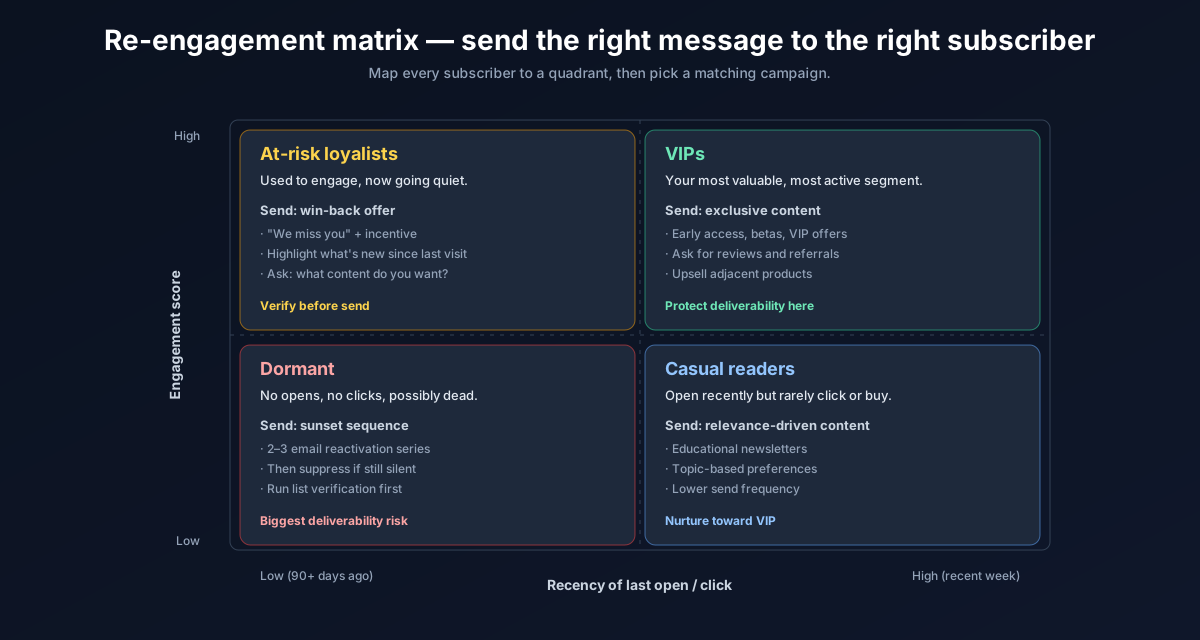
A re-engagement campaign (also called a "win-back" or "sunset" campaign) is a targeted email sequence sent to subscribers who have stopped opening or clicking your emails. The goal is either to reactivate them — getting them engaged again — or to identify them as permanently uninterested so you can remove them from your active list.
Both outcomes are wins. Re-engaged subscribers boost your results. Confirmed-inactive subscribers, once removed, improve your overall engagement metrics and protect your sender reputation.
This process works best when you segment inactive users deliberately, so it pairs naturally with email list segmentation and with a fresh hygiene pass from how to clean your email list for free.
When to run a re-engagement campaign
The right trigger depends on your email frequency. A general rule:
- Weekly senders — target subscribers inactive for 90 days (roughly 12+ missed emails)
- Bi-weekly senders — target subscribers inactive for 120–150 days
- Monthly senders — target subscribers inactive for 6–9 months
The key question is: has this person had enough reasonable opportunities to engage, and consistently chosen not to? If yes, it's time for a re-engagement attempt.
Before you send: verify the segment
Inactive subscribers are also the most likely to have invalid email addresses. People change jobs, abandon old personal accounts, and let addresses expire — and none of this generates an error until you actually try to send.
Before launching your re-engagement sequence, run the inactive segment through ListEmailCheck's bulk verifier. Remove invalid addresses first. This prevents a spike of hard bounces the moment you reactivate a dormant segment — which would harm your reputation far more than the inactive subscribers themselves.
The 3-email re-engagement sequence
Email 1 — The "We miss you" email (Day 1)
Keep it simple and honest. Acknowledge the silence, remind them why they subscribed, and offer clear value for staying.
Subject line options:
- "We haven't heard from you in a while"
- "Still interested in [topic]?"
- "A quick note from [Your Name]"
Body: Remind them what they signed up for. Share one genuinely useful piece of content — a resource, a tip, or a relevant update. End with a single low-friction CTA such as "Click here if you'd like to keep receiving emails."
Email 2 — The value email (Day 5–7)
For subscribers who didn't engage with Email 1, send a follow-up that leads with pure value — no re-engagement ask. Give them something worth opening: a checklist, a short guide, an exclusive offer, or a new feature announcement relevant to them.
If they click or open this email, move them back to your active segment. If not, proceed to Email 3.
Email 3 — The last-chance email (Day 12–14)
Be direct. Tell them you're going to stop emailing them unless they confirm they want to stay. This is the "permission reminder" email, and it reliably generates a small but meaningful response from people who do actually want to stay.
Subject line options:
- "This is our last email to you"
- "Should we say goodbye?"
- "Confirm in one click to stay subscribed"
Include a single prominent button: "Yes, keep me subscribed". Anyone who doesn't click within 3–5 days gets suppressed.
What to do with non-responders
After the three-email sequence, anyone who hasn't engaged at all should be suppressed — moved out of your active send list into a permanent suppression list or archive segment.
Do not delete them entirely from your database (you may need them for compliance records), but stop sending to them. Your active list is now smaller — and far healthier.
A smaller, engaged list consistently outperforms a large, disengaged one in every metric that matters: open rate, click rate, conversion rate, and deliverability.
Measuring the success of your re-engagement campaign
Track these metrics across the 3-email sequence:
- Re-engagement rate — % of inactive subscribers who opened or clicked at least one email in the sequence
- Unsubscribe rate — a high unsubscribe rate on Email 3 is actually healthy; it confirms the list is being cleaned
- Bounce rate — should be near zero if you verified the segment beforehand
- List size change — your active list will shrink, but your open rate on subsequent campaigns should improve noticeably
A successful re-engagement campaign typically reactivates 5–15% of the inactive segment. The remaining 85–95% who don't engage are better off suppressed.
Key takeaways
- Re-engagement campaigns either win back dormant subscribers or confirm they should be suppressed — both outcomes improve your list health
- Always verify the inactive segment before sending — these addresses accumulate invalids over time
- Use a 3-email sequence: missed you → pure value → last chance
- Anyone who doesn't respond to the full sequence should be suppressed, not deleted
- Expect a 5–15% re-engagement rate; the majority will be suppressed, and that's the goal
- Start by cleaning your inactive segment with the free ListEmailCheck bulk verifier before you send a single re-engagement email.