Why your email list gets dirty in the first place
Email addresses degrade over time. People change jobs, abandon old accounts, and sign up with typos. On average, 20–30% of any email list becomes undeliverable within 12 months. A dirty list costs you opens, increases hard bounces, and — at worst — gets your sending domain blacklisted or your ESP account suspended.
The good news: cleaning an email list is free if you use the right tools and know the process. This step-by-step guide covers exactly how to do it.
What "cleaning" an email list actually means
Cleaning an email list means identifying and removing addresses that will harm your deliverability or are simply not worth sending to:
- Invalid addresses — bad syntax, non-existent domains, or deleted mailboxes
- Disposable addresses — throwaway inboxes (Mailinator, Guerrilla Mail, etc.) that expire
- Duplicates — the same address appearing more than once
- Catch-all addresses — domains that accept all email, masking whether the mailbox exists
- Role addresses — generic addresses (info@, admin@, sales@) that often go unread
- Hard-bounce addresses — addresses that bounced in a previous campaign
Step 1 — Export your list as a CSV or TXT file
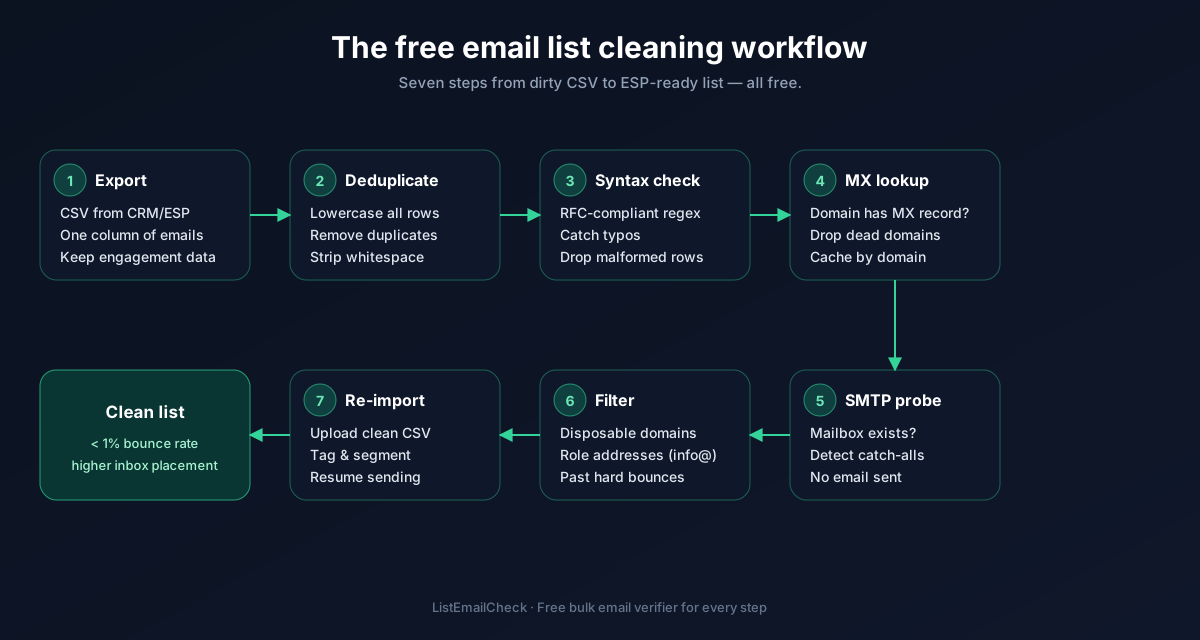
Export your list from your CRM or ESP. Most platforms (Mailchimp, HubSpot, ActiveCampaign, Apollo, etc.) let you export contacts as a CSV. Make sure the file has a column containing just email addresses.
Step 2 — Remove obvious duplicates first
Before uploading to any tool, do a quick deduplication in Excel/Google Sheets:
- In Excel: select your email column →
Data → Remove Duplicates - In Google Sheets:
Data → Data Cleanup → Remove Duplicates
Most email verification tools (including ListEmailCheck) deduplicate automatically on upload, but doing it first means you don't waste verification credits on duplicates.
Step 3 — Run the list through a free email verifier
This is the core of the cleaning process. A three-layer verification tool checks each address for:
- Syntax validity — is it formatted correctly?
- MX record existence — does the domain have working mail servers?
- SMTP deliverability — does the mailbox actually exist on the server?
ListEmailCheck's free bulk email verifier handles all three layers. Upload your CSV, wait for the results (typically 1–5 minutes for lists of a few thousand), and download the results as three separate files: valid, invalid, and risky.
Step 4 — Handle the "risky" bucket carefully
The risky category includes addresses that couldn't be fully confirmed — usually catch-all domains. Your options:
- Exclude them entirely — the safest option if you're protecting a cold outreach domain or have a strict bounce-rate threshold
- Send to them with a small test batch first — if you're sending newsletters to opted-in subscribers, a small test to gauge engagement before the full send is reasonable
Step 5 — Suppress hard bounces from previous campaigns
Any address that generated a hard bounce in a previous send must be permanently suppressed — not just removed from this campaign, but from all future sends. Your ESP should maintain a suppression list automatically; make sure it's enabled.
Step 6 — Import only the "valid" file back into your ESP
Import the clean "valid" CSV back into your email tool. Create a new audience segment or list if your ESP allows it so you can keep track of which contacts have been verified and when.
How often should you clean your email list?
As a rule of thumb:
- Cold outreach lists — before every new campaign sequence
- Newsletter lists — monthly, or before every major send to your full list
- CRM / lead databases — quarterly at minimum
Key takeaways
- 20–30% of any list becomes undeliverable within a year — regular cleaning is mandatory
- Three-layer verification (syntax + MX + SMTP) is the most thorough free method
- Always permanently suppress hard bounces, not just remove them from one campaign
- Treat catch-all addresses as risky and handle them separately
- ListEmailCheck's free bulk verifier is free for 1,000 verifications/day — no credit card needed