What is email list segmentation?
Email list segmentation is the practice of dividing your subscriber list into smaller groups based on shared characteristics, then sending each group content that is more relevant to them. Instead of blasting the same message to your entire list, you send the right message to the right subset.
The result: higher open rates, higher click-through rates, lower unsubscribe rates, and — most importantly for deliverability — higher positive engagement signals that tell inbox providers your emails are wanted.
If you need the strategic context first, start with what email deliverability is and how to clean your email list for free before segmenting the final send audience.
Why segmentation also protects your deliverability
Inbox providers like Gmail and Outlook use engagement signals to decide whether your emails go to the inbox or the spam folder. When you send to disengaged segments of your list, the low open rates and potential spam complaints drag down your sender reputation — affecting all your future sends, not just that campaign.
Segmenting so that you only send highly relevant content to each group keeps your engagement metrics healthy, which protects your sender score across the board.
The 6 most effective segmentation strategies
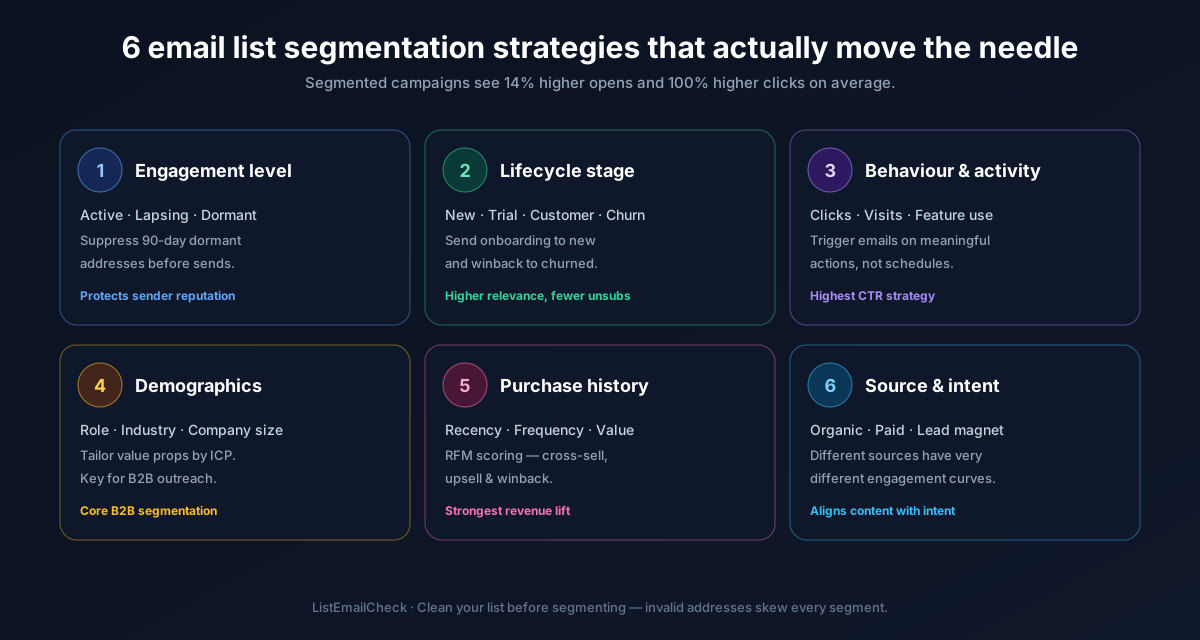
1. Engagement-based segmentation (the most important one)
Divide your list into engagement tiers based on how recently and frequently subscribers have opened or clicked your emails:
- Active — opened at least one email in the last 90 days
- Lapsing — last opened 90–180 days ago
- Inactive — no opens in 180+ days
Send your main campaigns only to active subscribers. Run a dedicated re-engagement campaign for the lapsing segment. Consider suppressing or sunsetting the inactive segment (more on this below).
2. Acquisition source segmentation
Subscribers acquired through different channels have different expectations and engagement patterns. Segment by:
- Blog opt-ins (top-of-funnel, educational content performs best)
- Checkout / free tool users (product-focused content and feature updates perform best)
- Webinar or event attendees (high-intent, sales-oriented content)
- Cold email replies or inbound sales enquiries (direct, concise outreach)
3. Product or plan tier
If you run a SaaS or tiered service, segment by what the subscriber is using:
- Free plan users → upgrade prompts, feature education
- Paid plan users → advanced tips, new feature announcements, loyalty offers
- Churned users → win-back sequences with targeted offers
4. Industry or job role (B2B)
For B2B email, sending the same message to a founder, a marketing manager, and an IT director is rarely effective. Segment by:
- Job function (marketing, sales, ops, technical)
- Company size (SMB vs. mid-market vs. enterprise)
- Industry (e-commerce, SaaS, agency, healthcare, etc.)
This data can come from your sign-up form, CRM enrichment, or tools like Clearbit.
5. Geographic segmentation
Timing matters. If your list spans multiple time zones, sending at 9am in New York means 2am for users in London and 10pm for users in Singapore. Segment by region to optimise send time, or use a send-time optimisation feature if your email platform supports it.
6. Purchase or usage behaviour
For e-commerce or product-led growth companies, segment based on what subscribers have actually done:
- Purchased category X → cross-sell complementary products
- Signed up but never completed onboarding → activation sequence
- Used the product heavily last month but not this month → re-engagement prompt
How to clean your segments before sending
Segmentation only improves results if the addresses within each segment are valid. Before launching any campaign — especially to a segment you haven't mailed in a while — verify the list first. Run each segment through ListEmailCheck's bulk verifier to remove invalid, disposable, and risky addresses before the send.
This is especially important for inactive or lapsing segments, where invalid addresses accumulate over time and can spike your bounce rate the moment you reactivate that group.
Quick segmentation wins you can implement today
- Suppress your inactive segment — anyone who hasn't opened an email in 180+ days should be excluded from regular campaigns immediately. This alone can significantly improve your open rate and deliverability scores.
- Tag by acquisition source — if you can see where a subscriber came from, tag them in your ESP right now so future campaigns can be targeted accordingly.
- Create a "VIP" segment — your most engaged subscribers (opened 5+ emails in the last 30 days) should get your best content first. Test subject lines and new formats on them before rolling out to the full list.
Key takeaways
- Segmentation improves relevance, engagement, and ultimately sender reputation
- Engagement-based segmentation (active / lapsing / inactive) is the highest-impact starting point
- Never send campaigns to unverified or long-inactive segments without cleaning the list first
- B2B lists should be segmented by role, industry, and company size for best results
- Suppress inactive subscribers from regular sends — poor engagement signals hurt all your emails
- Before mailing any segment, verify it with the free ListEmailCheck bulk verifier to remove invalid addresses before they become bounces.