What is email warm-up?
Email warm-up is the process of gradually increasing the sending volume from a new domain or IP address over several weeks. Inbox providers like Gmail and Outlook use historical sending behaviour to assess whether a sender is trustworthy. A domain that suddenly sends thousands of emails with no sending history is treated as high-risk — regardless of content quality.
Warm-up builds that history by starting with low volumes, generating positive engagement signals, and scaling up slowly enough that inbox providers learn to trust the sender.
Warm-up works best when the domain is already authenticated and the list is clean, so combine this with SPF, DKIM, and DMARC setup and cold email bounce prevention before you scale sending volume.
When do you need to warm up?
- Setting up a brand-new sending domain for the first time
- Registering a new subdomain for cold outreach (e.g.
mail.yourcompany.com) - Switching to a new dedicated IP address for email delivery
- Resuming sends after a long period of inactivity (3+ months without sending)
- Moving from a shared IP pool to a dedicated IP at your ESP
How long does warm-up take?
A standard warm-up schedule runs 4–6 weeks for most domains. High-volume senders targeting millions of emails per month may need 8–12 weeks. The exact timeline depends on your engagement rates — faster warm-up is possible if open and click rates are strong.
The warm-up schedule
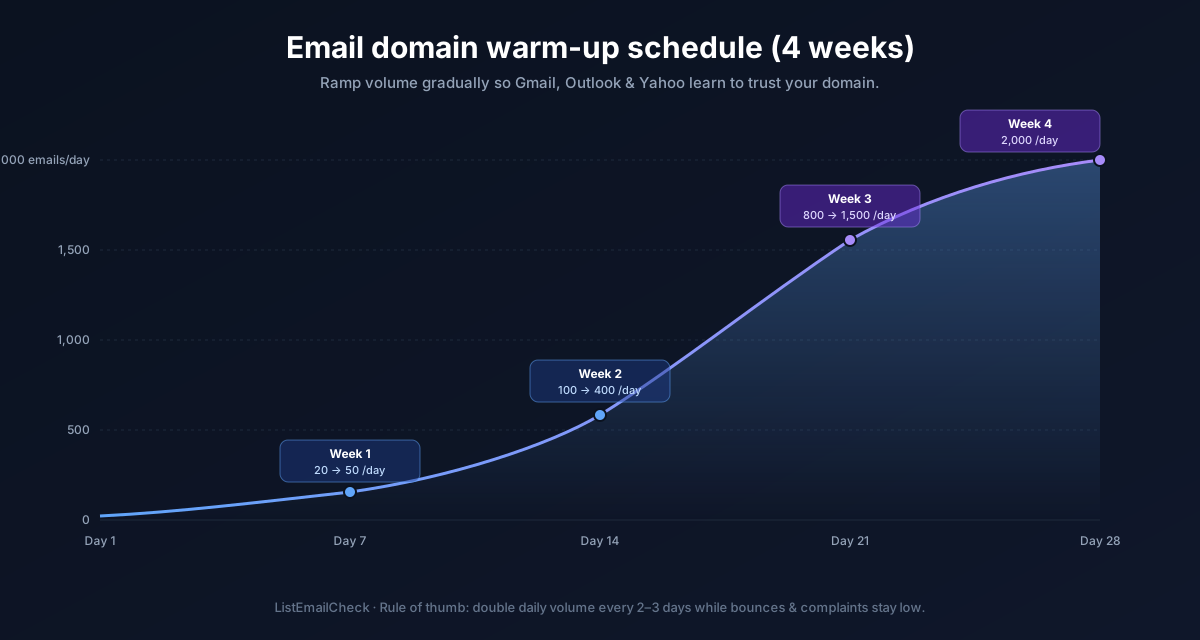
Start conservatively and increase by roughly 50–100% per week:
| Week | Daily send volume |
|---|---|
| Week 1 | 20–50 emails/day |
| Week 2 | 100–200 emails/day |
| Week 3 | 300–500 emails/day |
| Week 4 | 800–1,000 emails/day |
| Week 5 | 2,000–3,000 emails/day |
| Week 6+ | Scale based on engagement metrics |
During warm-up, send to your most engaged subscribers first — people who reliably open your emails. High engagement during warm-up accelerates the reputation-building process significantly.
Warm-up tools: automated vs. manual
Automated warm-up tools
Many cold email platforms (Instantly, Smartlead, Lemlist, Mailwarm) include built-in warm-up features that simulate email exchanges between a network of inboxes — sending automated messages and generating opens, replies, and "moved from spam" actions. This creates artificial engagement signals to accelerate the reputation build.
Most offer a free tier or free trial. This is the recommended approach for cold outreach domains.
Manual warm-up
For newsletter or marketing senders, manual warm-up is straightforward: send to your most engaged segment first, then expand the audience week by week. No special tooling required — just discipline around volume limits.
What to avoid during warm-up
- Sending to cold or unverified lists — during warm-up, every bounce and complaint has outsized impact. Only send to verified, opted-in addresses. Use ListEmailCheck to verify before any warm-up send.
- Jumping volume too quickly — doubling volume every day instead of every week is a spam signal. Steady, predictable increases are what inbox providers expect.
- Sending spammy content — warm-up builds infrastructure trust, not content trust. Spam trigger words in your subject lines can still cause filtering even on a healthy domain.
- Inconsistent sending cadence — sending 1,000 emails on Monday then nothing for a week then 2,000 emails on Thursday looks unpredictable. Maintain a consistent daily rhythm throughout warm-up.
How to monitor warm-up progress
- Google Postmaster Tools — tracks your domain reputation as seen by Gmail. Look for your reputation to move from "low" to "medium" to "high" over the warm-up period.
- Inbox placement testing — tools like Mail-Tester and GlockApps let you send a test email and see where it lands across multiple providers.
- Bounce and complaint rates — monitor daily. If either spikes above 0.5% (bounces) or 0.1% (complaints), pause and diagnose before continuing.
Key takeaways
- Warm-up is required for any new domain, subdomain, or IP before scaling email volume
- Start at 20–50 emails/day and scale up 50–100% per week over 4–6 weeks
- Send to your most engaged subscribers first during warm-up to maximise positive signals
- Automated warm-up tools are recommended for cold outreach domains
- Never send to unverified lists during warm-up — one bounce spike can set your reputation back weeks
- Verify every list before any warm-up send with the free ListEmailCheck bulk verifier.