Why a pre-send checklist matters
Email deliverability failures are almost always preventable. Emails end up in spam, get blocked, or generate high bounce rates because of issues that could have been caught before clicking send. This checklist covers every layer of deliverability — from infrastructure to list hygiene to content — so nothing slips through.
Run through this before every major campaign.
For deeper explanations of the checklist items, keep SPF, DKIM, and DMARC setup, email bounce rate benchmarks, and duplicate email removal close by.
Infrastructure checks
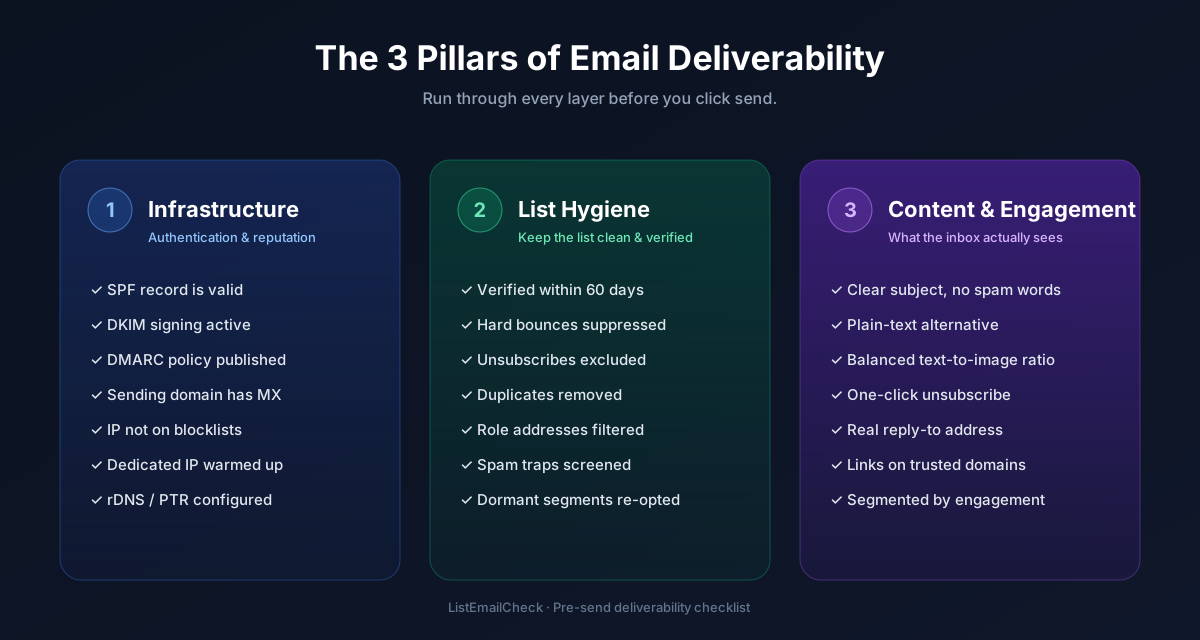
✅ SPF record is published and valid
Verify at MXToolbox SPF Checker. All sending services (ESP, CRM, transactional mailer) should be included in a single SPF record. Confirm the record has no more than 10 DNS lookups.
✅ DKIM signing is active for your sending domain
Check at MXToolbox DKIM Checker. Confirm the selector and key are live and matching what your ESP uses.
✅ DMARC policy is set (at minimum p=none)
Verify at MXToolbox DMARC Checker.
If you've already gone through a monitoring period with no issues, consider upgrading to
p=quarantine or p=reject.
✅ Sending domain has a valid MX record
Even if you only send outbound email, a missing MX record on your sending domain looks
suspicious to some filtering systems. Verify with dig MX yourdomain.com or MXToolbox.
✅ Sending IP is not on a major blocklist
Check your ESP's sending IP against blocklists at MXToolbox Blacklist Check or Barracuda Central. If your ESP manages shared IPs, this is their responsibility — but for dedicated IPs, check before every major send.
List hygiene checks
✅ List verified within the last 60 days
Run your send list through ListEmailCheck's bulk verifier before importing to your ESP. Remove invalid, disposable, and high-risk addresses. Any segment dormant for 60+ days must be re-verified.
✅ Hard bounces from previous campaigns are suppressed
Every address that hard-bounced on a previous send must be on your global suppression list. Check that your ESP has these suppressed and that they haven't been re-imported from a CRM sync.
✅ Unsubscribed addresses are excluded
Confirm your ESP's unsubscribe list is up to date and is being applied to this send. If you manage suppression lists manually across multiple tools, cross-check them.
✅ Spam complainants are suppressed
Any address that filed a spam complaint (via FBL data or ESP reporting) should be globally suppressed, not just removed from the current campaign.
✅ Inactive subscribers are excluded (or in a separate segment)
For regular campaigns, exclude subscribers with zero engagement in the last 90–180 days. If you must send to inactive subscribers, use a separate re-engagement campaign rather than including them in your main send.
Content checks
✅ Subject line passes a spam check
Avoid spam trigger phrases: "FREE!!!", "Act Now", "Guaranteed", "No credit card required", all-caps words, and excessive punctuation (!!!). Test your subject line with Mail-Tester before sending.
✅ From name and From address are consistent and recognisable
Use the same From name you've always used. Inbox providers use consistency as a trust signal, and recipients are less likely to open (or more likely to report spam) if the sender name looks unfamiliar.
✅ Unsubscribe link is present and functional
Test the unsubscribe link in your email before sending. It must work and process requests
within 10 business days under CAN-SPAM (2 days under GDPR best practice).
Google and Yahoo require a one-click unsubscribe header (List-Unsubscribe)
for all bulk senders.
✅ Plain-text version is included
Always send a multipart MIME email with both HTML and plain-text versions. HTML-only emails are a spam signal. Your ESP should handle this automatically — confirm it's enabled.
✅ All links are working and not on blocklists
Click every link in your email before sending. Check any URLs you're linking to against MXToolbox — linking to a blacklisted domain in your email can trigger spam filtering even if your own domain is clean.
Final checks
✅ Send time is optimised for recipient time zones
For newsletters: Tuesday–Thursday, 9–11am local time for your primary audience. If your list spans multiple regions, use time-zone-based sending if your ESP supports it, or segment by region.
✅ A/B test is set up correctly (if applicable)
Confirm the test variant split, the winning metric (open rate, click rate, revenue), and the hold-out period before the winner is sent to the remaining list.
✅ Campaign tracking parameters are in place
UTM parameters on all links should be set correctly so campaign traffic is attributed properly in Google Analytics or your analytics tool.
Key takeaways
- Infrastructure (SPF, DKIM, DMARC) must be validated before every major sending period, not just once at setup
- List hygiene is the single most controllable deliverability factor — verify, deduplicate, and suppress before every send
- Content issues (spam trigger words, missing plain text, broken links) can cause filtering even on a reputable domain
- The unsubscribe link must work — test it before every send
- Start with the list hygiene step: run your send list through the free ListEmailCheck bulk verifier to remove invalid addresses before anything else.